Helpful FAQ sections for SEO answer real follow-up questions that readers have while completing a task. The best sections use evidence-based questions, concise accurate answers, accessible headings and a clear maintenance plan rather than adding keywords for their own sake.
Quick Answer
Write FAQ sections for SEO by collecting genuine reader questions, selecting those that support the page’s main purpose, and answering each one clearly in plain language. Place the section where it helps readers, avoid repeating the article, and keep answers accurate as products or policies change. FAQ markup is optional and does not guarantee rich results. Success means readers can resolve relevant questions without leaving the page, not that a particular search feature appears.
Key Takeaways
Start with the reader’s task, not a list of keywords. Choose specific questions that naturally follow the main article. Answer directly before adding necessary context. Avoid inventing questions just to increase page length. Use accessible headings and visible answers. Keep FAQPage structured data consistent with the visible text when it is appropriate to implement. Measure usefulness with feedback and behavior rather than assuming a ranking lift. Maintain answers when details change, especially prices, policies, requirements and technical instructions.
Identify the page’s purpose before collecting questions
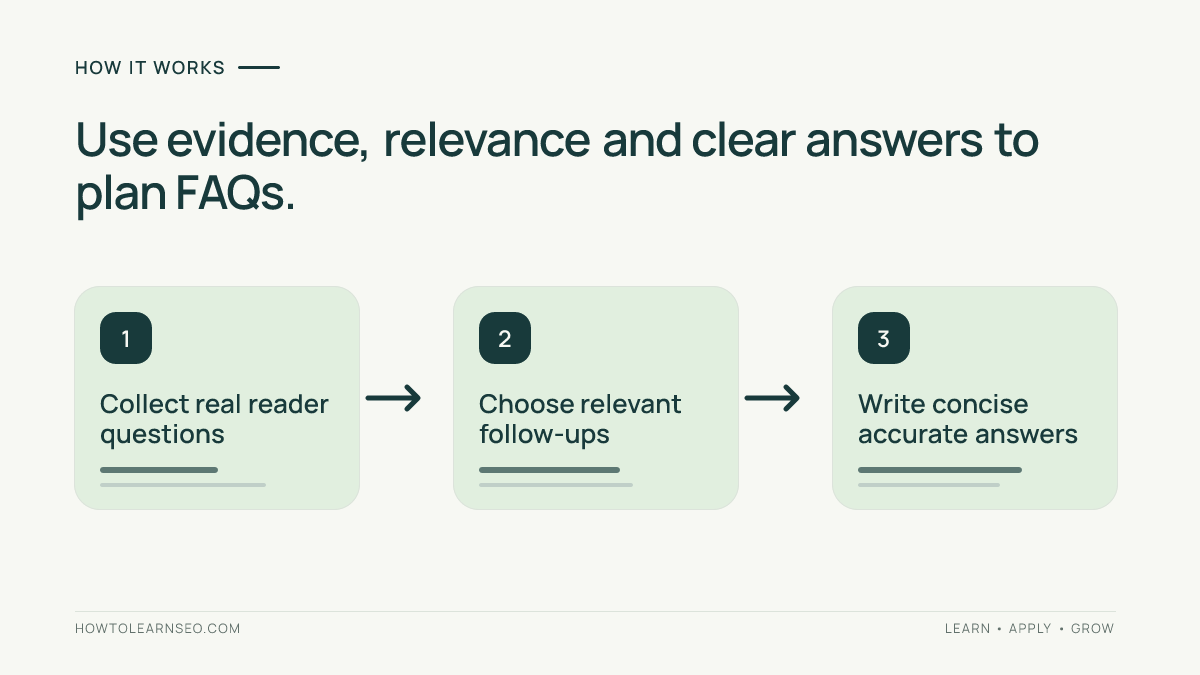
An FAQ section should support the primary page, not become a competing mini-article. A beginner guide to image optimization may need answers about file formats, alternative text and image dimensions. A service page may need eligibility, appointment preparation and turnaround information. Start by writing one sentence that describes what the reader should accomplish on the page. Then list the uncertainties that might prevent that outcome. Consult the site’s search intent guide when a page serves several audiences. If questions address a different goal, plan a separate resource and link to it rather than attaching unrelated answers to the bottom of every page.
Collect questions from real evidence
Use support tickets, sales conversations, on-site search queries, product documentation, community feedback and questions your team regularly answers. Search Console query patterns can also suggest wording, but query data is incomplete and not every search warrants an FAQ. Review a small sample of competing pages to understand reader expectations without copying their answers. Record each candidate question, where it came from, its audience and the action the answer should enable. Do not claim that a question is frequently asked unless your evidence supports that description. If you have no customer data, label questions as editorial hypotheses and validate them with colleagues who know the subject.
Choose questions with a simple relevance test
For each candidate, ask whether the reader would reasonably wonder about it while completing the page’s main task. Keep questions that clarify requirements, decisions, exceptions, costs or troubleshooting. Remove questions whose answers merely repeat a nearby heading or exist only to include a keyword. A narrow FAQ section with four excellent answers may be more useful than a long generic list; article templates that require six FAQs should still use six distinct and genuine questions. Group near-duplicates together, and use one clear question per answer. For more systematic planning, document audience and scope in an SEO content brief before writing.
Write direct answers without losing nuance
Start with the answer rather than a long introduction. If a question asks whether a page can use multiple H2 headings, answer yes and explain that headings should follow the document’s logical structure. When the answer depends on circumstances, state the condition immediately. Avoid absolute claims such as always, never or guaranteed unless the underlying rule truly supports them. Give one practical next step when useful. A short answer can link to a detailed guide, but the visible answer should still resolve the immediate question. Keep terminology consistent with the rest of the article so readers are not forced to interpret two names for the same concept.
Use a readable and accessible page structure
Place FAQs after the main explanation when they resolve follow-up concerns; put a critical answer earlier if readers need it to complete the task. Use a descriptive H2 such as Frequently Asked Questions, then H3 headings for individual questions. Write answers in ordinary paragraphs, with lists only when steps genuinely require them. Ensure any accordion interface is keyboard accessible and does not hide essential content from users who cannot operate it. Avoid stuffing several questions into one heading. Each answer should be visible or easily accessible on the page. Do not create a separate URL for every tiny answer unless there is a distinct need for a full resource.
Decide whether structured data is appropriate
Google’s FAQPage documentation explains markup requirements and search appearance limitations. FAQ rich results are generally limited to well-known authoritative government and health websites, so ordinary commercial or educational sites should not expect them. Structured data must represent the visible page accurately; adding schema does not make weak answers helpful. If your site already produces FAQPage markup, inspect whether it duplicates another plugin’s output. Do not add multiple conflicting FAQPage blocks to chase rich results. The distinction between FAQ and HowTo structured data matters when selecting markup. Follow Google’s current documentation rather than old screenshots promising universal FAQ rich results.
Worked example: a beginner’s image optimization guide
Suppose a fictional publisher is updating an image optimization tutorial. Input: eight candidate questions gathered from editorial notes, including how to name image files, whether decorative images need alt text, and whether all images must use WebP. Rule: select questions that address a distinct uncertainty and can be answered accurately in one short paragraph. Action: retain six relevant questions, rewrite vague headings into natural questions, and remove two duplicates already explained in the main article. Expected result: readers can decide what to do with an image without rereading the whole guide. Verification: ask a colleague unfamiliar with the draft to locate answers to three specific tasks, then inspect the rendered headings and links. Edge case: a question about image licensing requires legal or policy expertise, so link to an authoritative resource rather than inventing a universal rule. This is an illustrative workflow, not a measured SEO experiment.
Check the facts behind each answer
An FAQ answer may look concise while still being wrong. For technical questions, verify the rule against official product documentation. For business pages, confirm fees, availability and conditions with the responsible owner. Distinguish recommendations from requirements: Google Search Central’s helpful content guidance emphasizes people-first usefulness, not an FAQ count or keyword formula. If an answer involves a changing feature, record a review date internally and link to the official source when helpful. Never fabricate statistics, customer quotes, rankings or experiments. A transparent answer that says a decision depends on context is better than a confident but misleading shortcut.
Avoid duplicate answers across the site
Sitewide FAQ templates often repeat the same generic questions on dozens of pages. That may help little and can obscure the distinctive information readers need. Review whether a question belongs on the specific page, a centralized help page or a broader learning resource. When two articles serve different stages of a task, tailor the answers to those stages rather than pasting identical paragraphs. For example, a beginner guide can define canonical URLs while a migration checklist can explain how to verify canonical signals after launch. Use internal links to connect complementary pages, but do not force them into every answer. The goal is a coherent learning path, not artificial page length.
Make the section useful for AI-assisted discovery
Clear question-and-answer structure can make information easier for readers and automated systems to interpret, but there is no special FAQ formula that guarantees citation in AI answers. State facts explicitly, explain important conditions and identify the entity or process being discussed. Avoid vague answers such as ‘it depends’ without naming what it depends on. A clear explanation of a policy should include the policy’s actual scope and exceptions. For broader principles, read the site’s answer engine optimization guide. Treat AI discoverability as a possible secondary benefit, never as a reason to invent FAQ content.
Verify the finished FAQ section
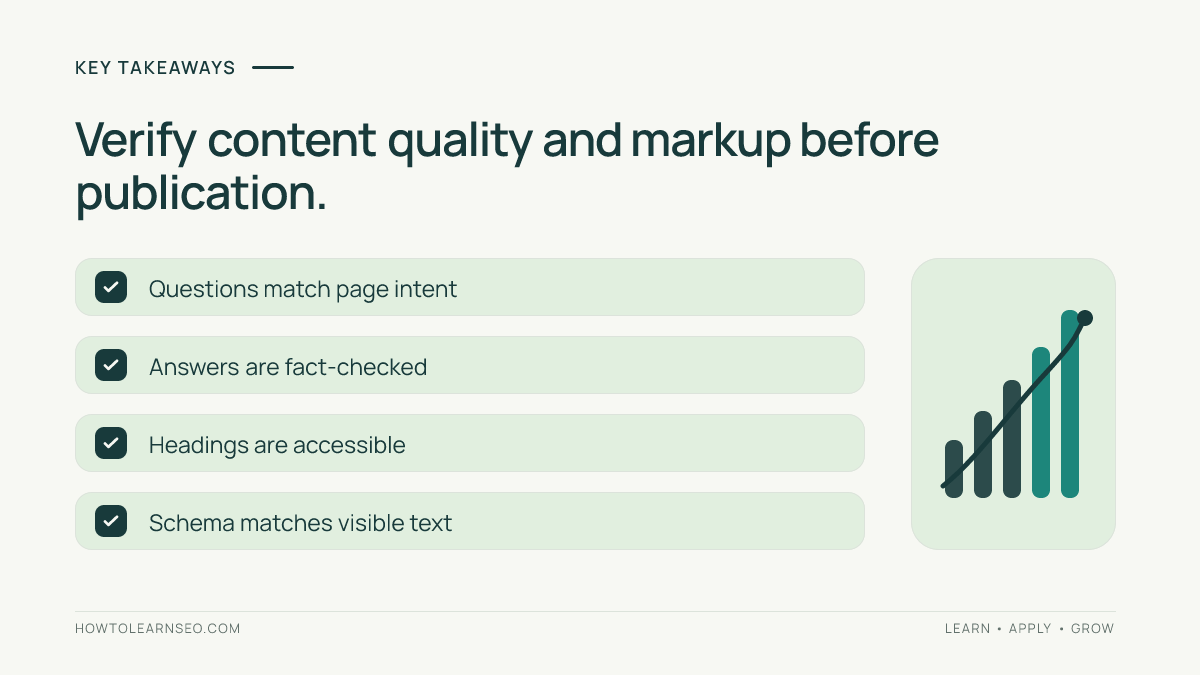
Read the page as a first-time visitor. Can someone find the relevant question quickly? Does the answer resolve the question without contradicting the main content? Check heading order, links, mobile spacing and accordion behavior. If structured data is present, inspect the rendered page and test the markup with an appropriate validator. Google’s structured data policies clarify that valid markup alone does not guarantee enhanced search appearance. Verify that marked-up questions and answers match the visible page exactly. If the FAQ is maintained in a content management system, check that editorial updates also update the schema output.
Measure usefulness and maintain accuracy
Define a useful outcome before publishing. For support pages, monitor whether readers still ask the same question. For educational articles, consider feedback, relevant internal-link clicks and whether users can complete the described task. Analytics can provide directional signals, but an increase in impressions does not prove that FAQs caused it. Compare similar periods, account for broader page changes and avoid declaring a causal ranking win without controlled evidence. Review FAQs when product features, documentation, regulations or site policies change. Retire obsolete questions instead of accumulating outdated answers. A short, accurate section is more valuable than a large one that no one maintains.
Common mistakes that reduce FAQ value
Do not copy competitor questions and answers without checking their accuracy or relevance. Do not add a question whose answer is a sales pitch instead of an explanation. Do not repeat the main article word for word. Avoid vague headings, unsupported guarantees, invented ‘popular’ questions and markup that describes invisible content. Do not assume every page needs an FAQ. If a reader needs a full tutorial to understand the answer, link to the appropriate guide and keep the FAQ concise. For other ways to improve snippet clarity, review SEO titles and descriptions. Above all, do not confuse eligibility for a search feature with the quality of the underlying answer.
A practical editorial checklist
Before approval, confirm the section has a clear audience and purpose, every question is relevant, each answer is factually supported, and no answer contradicts the page. Verify that headings are accessible, links work and markup reflects visible content. Ask whether a reader can act on the answer or at least understand the next step. Record ownership for updates when facts are likely to change. If the FAQ feels repetitive, remove the weakest questions and improve the core article instead. This final check protects the reader’s time and keeps the page useful long after publication.
Frequently Asked Questions
How many questions should an SEO FAQ section include?
Use only the number needed to answer genuine follow-up questions. There is no Google ranking requirement for a particular FAQ count.
Does FAQ schema guarantee FAQ rich results?
No. Google restricts FAQ rich results mainly to eligible authoritative government and health websites, and valid markup never guarantees a rich result.
Can I put FAQs on a service page?
Yes, when the questions help customers understand the service, requirements, process or relevant limitations and the answers are accurate.
Should FAQs repeat the article’s main headings?
Usually not. Use FAQs for unresolved follow-up questions and edge cases rather than duplicating explanations already available above.
Can AI write my FAQ answers?
AI can help draft answers, but a knowledgeable editor must verify factual claims, policy details and source accuracy before publishing.
How often should I update FAQ content?
Review it whenever relevant policies, product features or technical guidance change. Stable evergreen answers may need less frequent checks.
Conclusion
Useful FAQ sections for SEO begin with genuine reader uncertainty and end with clear, verifiable answers. Choose questions that belong on the page, edit for accuracy, keep the structure accessible and review the content when facts change. Treat structured data as an optional technical representation, not the purpose of the section. Readers should leave knowing what to do next.