
Launching a brand new website and expecting Google to send you traffic is a bit like opening a store in a city where nobody knows you exist yet. There’s no overnight fix — but there is a clear, proven path. The challenge for most beginners isn’t a lack of effort — it’s not knowing which steps to take first, and in what order. This guide walks you through exactly how to do SEO for a new website in 2026, from the very first technical setup all the way to publishing content that actually ranks.
Why SEO for New Websites is Different
Starting SEO on a new website is a unique challenge. Unlike an established site with existing authority, backlinks, and ranking history, a new website starts with zero trust signals. Google doesn’t know who you are yet — and it won’t take your word for it until you’ve proven yourself consistently over time.
New websites also often go through what’s called the Google Sandbox — an informal period where Google holds back rankings while it evaluates your domain’s credibility. This typically lasts three to six months and affects almost every new website regardless of content quality.
The good news is that the sandbox effect can be shortened by doing things right from day one. Following a structured SEO approach from launch — rather than trying to fix things later — gives new websites the fastest possible path to real organic traffic.
Step 1 — Get Your Technical Foundation Right
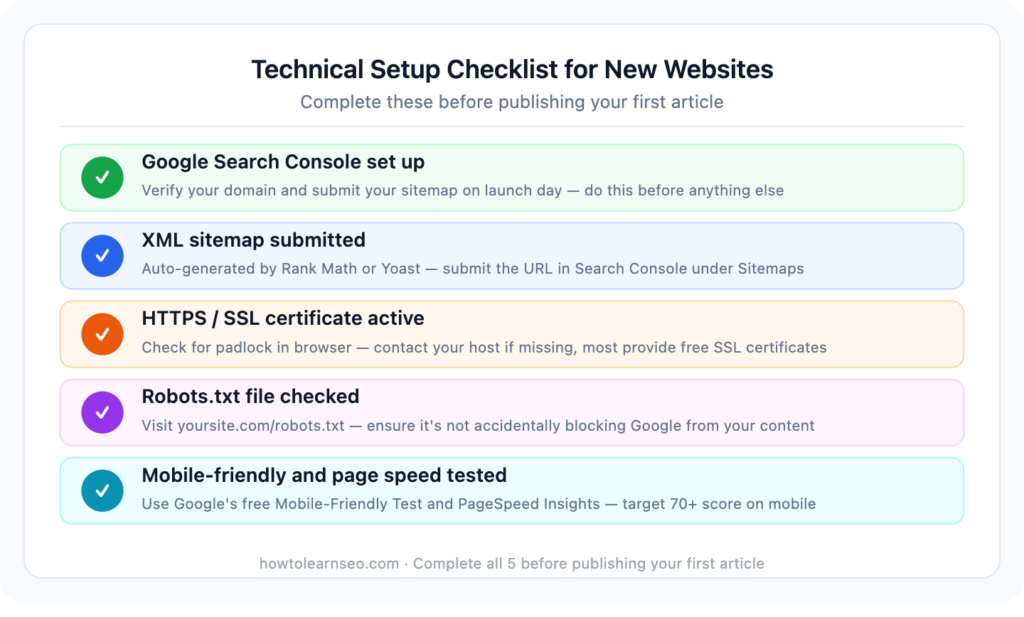
Before writing a single article, make sure Google can actually find, crawl, and index your website. Many new websites publish dozens of articles before realising Google can barely access them.
Set up Google Search Console This is the first thing to do after launch. Google Search Console is free, connects directly to Google, and shows you whether your pages are being indexed, which keywords are bringing impressions, and any technical issues affecting your site. Without it, you’re essentially flying blind.
Once your site is live, improving your page speed is one of the highest-impact technical tasks — here is our complete WordPress speed optimisation guide.
Submit your XML sitemap A sitemap is a file that lists all your website’s pages. Submit it to Google Search Console so Google knows exactly which pages you want indexed. WordPress plugins like Rank Math or Yoast generate your sitemap automatically — just copy the URL and submit it in Search Console under Sitemaps.
Check your robots.txt file This file tells Google which pages to crawl and which to ignore. A misconfigured robots.txt can accidentally block Google from your entire site — a surprisingly common mistake on new websites. Check it at yoursite.com/robots.txt and make sure it’s not blocking important pages.
Make sure your site uses HTTPS Google considers HTTPS a ranking signal and browsers flag HTTP sites as “Not Secure” — which kills visitor trust before they’ve read a single word. Most hosting providers include a free SSL certificate. If yours doesn’t show a padlock in the browser, contact your host and get one installed immediately.
Test your mobile experience Over 60% of searches happen on mobile. Google uses mobile-first indexing — meaning it evaluates the mobile version of your site first when deciding how to rank it. Use Google’s free Mobile-Friendly Test to check that your site looks and works correctly on small screens.
Check your page speed Slow sites rank lower and lose visitors faster. Use Google’s free PageSpeed Insights tool to check your score. A score above 70 on mobile is the baseline target. Common fixes include compressing images, enabling caching, and reducing unused scripts.
Step 2 — Do Keyword Research Before Writing Anything
This is the step most new website owners skip — and it’s the most important one. Publishing content without keyword research is like driving without a map. You might eventually get somewhere useful, but you’ll waste a lot of time.
Start with your niche’s core topics Write down five to ten broad topics your site will cover. These become your seed keywords. For an SEO blog, seeds might be: keyword research, on-page SEO, backlinks, technical SEO, SEO tools.
For a deeper understanding of all technical SEO elements, read our complete what is technical SEO guide.
Find low-competition long-tail keywords New websites cannot compete for short, high-volume keywords against established authority sites. Instead, target long-tail keywords — four or more words, specific intent, lower competition. “SEO tips for beginners 2026” will rank faster on a new site than “SEO tips” — by a wide margin.
Use free tools like Google Keyword Planner or AnswerThePublic to find question-based keyword variations. Look for keywords with clear search intent and keyword difficulty under 20 in paid tools like Mangools or SE Ranking.
Map one keyword to one page Every page on your site should target one primary keyword. Two pages targeting the same keyword compete with each other — this is called keyword cannibalization and it’s a common mistake that actively hurts rankings.
Step 3 — Plan Your Site Architecture
Before you start publishing, plan how your site will be structured. A logical, clean architecture helps Google understand your site’s topical focus and helps readers navigate it easily — both of which are ranking signals.
For a content blog or affiliate site, a simple structure works best:
- Homepage — introduces the site and links to main categories
- Category pages — group related articles together (e.g. On-Page SEO, Link Building, SEO Tools)
- Individual articles — each targeting one specific keyword
Keep your URL structure clean and short. /on-page-seo-checklist/ is better than /blog/2026/04/on-page-seo-checklist-for-beginners/. Short, descriptive URLs perform better in both rankings and click-through rates.
Step 4 — Optimise Every Page with On-Page SEO
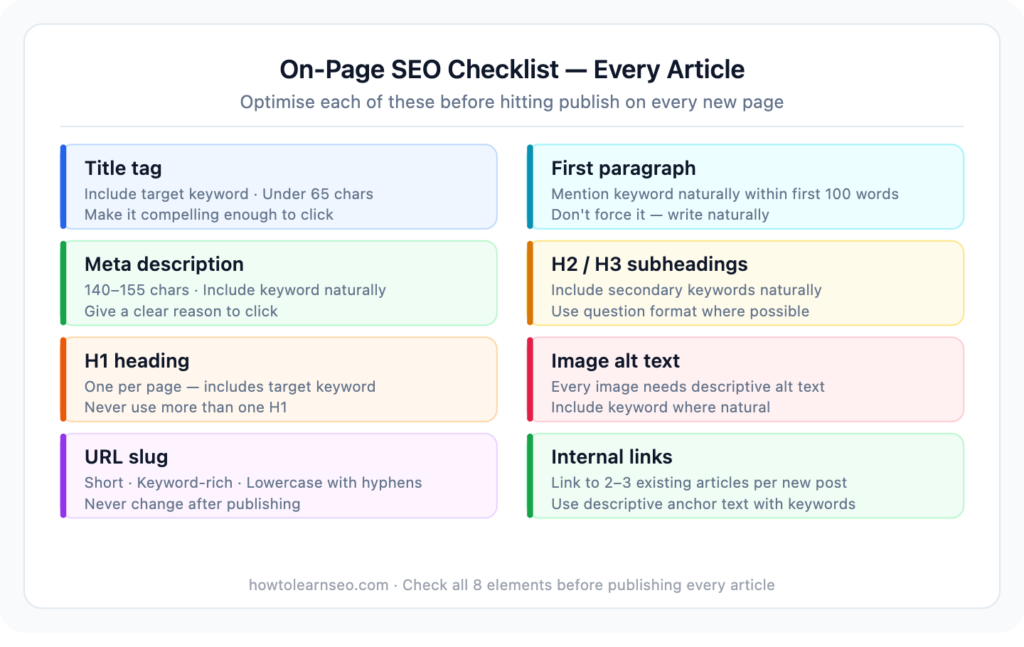
Once your site structure is planned and you’ve identified your keywords, every page you publish needs proper on-page SEO before it goes live.
Title tag Include your target keyword naturally in the title. Keep it under 65 characters. Make it compelling enough that someone scanning Google results would want to click it.
Meta description Write a 140–155 character summary that includes your keyword and gives the reader a clear reason to click. Google doesn’t always use your meta description, but a well-written one improves click-through rate significantly.
H1 heading Your main article heading should include your target keyword and be the only H1 on the page. Every article gets one H1 — no more.
H2 and H3 subheadings Use H2s to break your content into clear sections. Include secondary and related keywords naturally in subheadings. This helps Google understand what each section covers and improves the article’s chances of appearing in featured snippets and AI Overviews.
First paragraph Mention your target keyword naturally within the first 100 words. Don’t force it — just make sure it appears early enough to signal the topic clearly.
Image alt text Every image needs a descriptive alt text that includes a keyword where relevant. Alt text helps Google understand images and is an accessibility requirement.
URL slug Keep it short, keyword-rich, and all lowercase with hyphens between words. No dates, no stop words, no special characters.
Step 5 — Create Content That Targets Low-Competition Keywords First
For a new website, the content strategy is simple — start where you can win.
Target keywords with low competition to build your first rankings. These early wins do two important things. First, they bring in initial traffic that proves your site delivers value. Second, they build the domain authority that will eventually help you rank for harder keywords later.
Write long-form, genuinely helpful content Google consistently rewards depth. A 2,000-word article that thoroughly answers a question will outrank a 600-word article on the same topic, assuming both are well-written. Cover the topic completely — include examples, answer follow-up questions, and address common mistakes.
Match the search intent Before writing any article, check what Google already ranks at position one for your target keyword. If all the top results are listicles, write a listicle. If they’re how-to guides, write a how-to guide. Mismatching your content format with what Google already rewards for that keyword is one of the most common beginner mistakes.
Publish consistently Two quality articles per week beats seven thin articles. Consistency signals to Google that your site is active and growing. Irregular publishing — a burst of ten articles followed by silence — doesn’t build momentum the same way.
Step 6 — Build Internal Links From Day One
Internal links are one of the most underused SEO tools available to new websites — and they’re completely free. Every new article you publish should link to at least two or three existing articles, and your existing articles should be updated to link back to the new one.
Internal linking does three important things:
- Helps Google discover and index new pages faster
- Passes authority from established pages to newer ones
- Keeps readers on your site longer — which improves user engagement signals
Use descriptive anchor text that includes keywords where natural. “Read our guide on keyword research” is better than “click here.” The linked text gives Google a signal about what the destination page covers.
Step 7 — Set Up Google Analytics 4
Google Search Console tells you how your site performs in search. Google Analytics 4 tells you what happens after visitors arrive — which pages they read, how long they stay, and where they drop off.
Set up GA4 from day one so you have historical data from launch. It’s free, takes 15 minutes to set up, and gives you data you’ll rely on for every SEO decision you make going forward.
Step 8 — Start Building Your First Backlinks
Backlinks remain one of the strongest ranking signals in 2026. New websites can’t wait for backlinks to appear organically — you need to proactively start building them once your foundation is solid.
Easy first backlinks for new websites:
- Reddit and Quora — Answer relevant questions helpfully and link to your articles where genuinely useful. No spamming — only link when it adds real value.
- Guest posting — Write a free article for another blog in your niche in exchange for a link back to your site. Even one or two quality guest posts in your first three months can meaningfully accelerate your timeline.
- Business directories — Submit your site to relevant, reputable directories in your niche.
- Social sharing — Share every new article on your social profiles. While social links don’t pass direct SEO authority, they drive real traffic and increase the chance of someone linking to your content.
You don’t need hundreds of backlinks in your first six months. Five to ten quality links from relevant, trustworthy sites will do more for a new website than fifty links from irrelevant directories.
Step 9 — Be Patient and Track Your Progress
The most common reason new websites fail at SEO isn’t bad content or poor optimisation — it’s giving up too early. The Google Sandbox effect and the natural time it takes for authority to build means most new websites won’t see significant traffic for three to six months.
Set a realistic monthly check-in routine:
- Google Search Console — Are impressions growing? Are new keywords appearing? Are any pages getting close to page one?
- Google Analytics — Is organic traffic trending upward, even if slowly?
- Rank tracking — Pick your 10 most important target keywords and track them monthly
Slow, steady upward movement in all three is exactly what success looks like in months two through six. If things feel stagnant, check for technical indexing issues first — they’re the most common hidden blocker for new sites.
Common New Website SEO Mistakes to Avoid
Targeting competitive keywords too early — Ranking for “SEO tips” on a new site is almost impossible. Target long-tail, low-competition variations first and build up.
Publishing without keyword research — Every article should target a real keyword with real search volume. Writing content nobody searches for produces content nobody finds.
Ignoring internal linking — New websites leave enormous amounts of authority on the table by not connecting their articles together. Every published article is an opportunity to strengthen others.
Changing your URL slugs after publishing — Once an article is indexed with a URL, changing it means starting from scratch for that URL. Get your slugs right before publishing and don’t change them.
Not setting up Search Console immediately — Many new website owners set it up weeks or months after launch, losing valuable early data. Do it on day one.
Key Takeaways
- New websites start with zero trust — the Google Sandbox means results take three to six months regardless of content quality
- Technical setup comes first — HTTPS, sitemap, Search Console, and mobile optimisation before publishing anything
- Target long-tail, low-competition keywords to build early wins that compound into larger authority
- One keyword per page — keyword cannibalization actively hurts rankings
- Internal linking from day one is one of the highest-leverage free SEO strategies available
- Consistent publishing of quality content beats sporadic bursts of thin articles every time
- Five to ten quality backlinks in your first six months will meaningfully accelerate your timeline
- Track progress monthly in Search Console and GA4 — steady upward trends are what success looks like early on
Frequently Asked Questions
Q1: How long does SEO take for a brand new website? Most new websites begin seeing their first meaningful organic traffic between three and six months after launch, assuming consistent publishing and proper technical setup. The Google Sandbox effect — where Google holds back rankings while evaluating new domains — affects most new sites regardless of content quality. Targeting very low-competition long-tail keywords can produce first rankings in as little as four to eight weeks.
Q2: Do I need backlinks to rank a new website? Not immediately. A new website can start ranking for low-competition long-tail keywords with strong content and proper on-page SEO alone. However, backlinks become increasingly important as you target more competitive keywords. Even five to ten quality backlinks in your first six months can noticeably accelerate how quickly pages rank.
Q3: How many articles should I publish before submitting my site to Google? Ideally, have at least five to ten well-optimised articles live before actively promoting your site. This gives Google enough content to evaluate your site’s topical focus and gives visitors a reason to stay and explore beyond a single page. Submit your sitemap to Google Search Console on launch day regardless of how many articles are published.
Q4: Should I focus on one topic or cover multiple topics on a new website? Focus on one core topic area when starting out. A site that publishes exclusively about SEO will build topical authority in that niche faster than a site that covers SEO, social media, email marketing, and web design in equal measure. Topical depth signals expertise to Google. Once you’ve established authority in your core niche, expanding to adjacent topics becomes much more effective.
Q5: What is the Google Sandbox and how long does it last? The Google Sandbox is an informal term for the period where new websites see suppressed rankings while Google evaluates the domain’s credibility and content quality. It typically lasts three to six months. Doing things right from day one — solid technical foundation, consistent publishing, and early backlink building — can shorten this period, but it cannot be skipped entirely. Most new sites see rankings accelerate significantly after the six-month mark.