
Most SEO guides tell you to “optimise your content” without explaining exactly what that means in practice. This checklist fixes that. Every item below is something you can check and action on every single article before it goes live — no guesswork, no missing steps. Work through this list consistently and your on-page SEO will be stronger than the majority of sites competing for the same keywords.
What Is On-Page SEO?
On-page SEO is the practice of optimising individual web pages to rank higher in search engines and attract more relevant organic traffic. It covers everything you control directly on your own page — content quality, title tags, meta descriptions, heading structure, internal links, image optimisation, schema markup, and page speed.
Unlike off-page SEO which depends on earning backlinks from other sites, on-page SEO is entirely in your control. That makes it the best starting point for any beginner — and the foundation every more advanced SEO strategy builds on top of.
Pages with strong on-page SEO receive up to five times more organic traffic than poorly optimised pages targeting the same keyword. Working through a consistent checklist before publishing is the simplest way to make sure you’re never leaving that potential on the table.
The Complete On-Page SEO Checklist for 2026
1. Target One Primary Keyword Per Page
Every page should target one primary keyword. Two pages targeting the same keyword compete with each other — this is called keyword cannibalization and it actively hurts both pages’ rankings.
Before writing anything, confirm your primary keyword has real search volume, matches the intent of the content you’re creating, and isn’t already targeted by another page on your site.
Check: Is there one clear primary keyword for this page that no other page on your site targets?
2. Match Your Content to Search Intent
Search intent is the reason behind a search query. Before writing a single word, check what Google already ranks at position one for your target keyword. If the top results are all listicles, write a listicle. If they’re all how-to guides, write a how-to guide. If they’re comparison articles, write a comparison.
For a deeper look at the full writing process, read our complete guide on how to write SEO-friendly blog posts.
Mismatching your content format with what Google already rewards for that keyword is one of the most common beginner mistakes — and no amount of optimisation fixes a fundamental intent mismatch.
Check: Does your content format match what’s already ranking on page one for your target keyword?
3. Write a Compelling Title Tag
Your title tag is the single most important on-page SEO element. It’s what appears as the clickable headline in Google search results and is Google’s first signal about what your page covers.
Rules for a strong title tag:
- Include your primary keyword — ideally within the first three to four words
- Keep it under 65 characters so it doesn’t get cut off in search results
- Make it compelling enough that someone scanning results would want to click it
- Use power words where natural — “complete”, “proven”, “2026”, “checklist” drive higher click-through rates
Check: Is your primary keyword in the title? Is it under 65 characters? Would you click it?
4. Write a Click-Worthy Meta Description
The meta description appears beneath your title in search results. While it’s not a direct ranking factor, a well-written meta description significantly improves your click-through rate — and click-through rate is a user engagement signal Google monitors closely.
Rules for a strong meta description:
- Keep it between 140 and 155 characters
- Include your primary keyword naturally — Google often bolds matching terms in results
- Give the reader a clear reason to click — what will they learn or get?
- Don’t just describe the content — sell the click
Check: Does your meta description include your keyword? Is it between 140 and 155 characters? Does it give a clear reason to click?
5. Optimise Your URL Slug
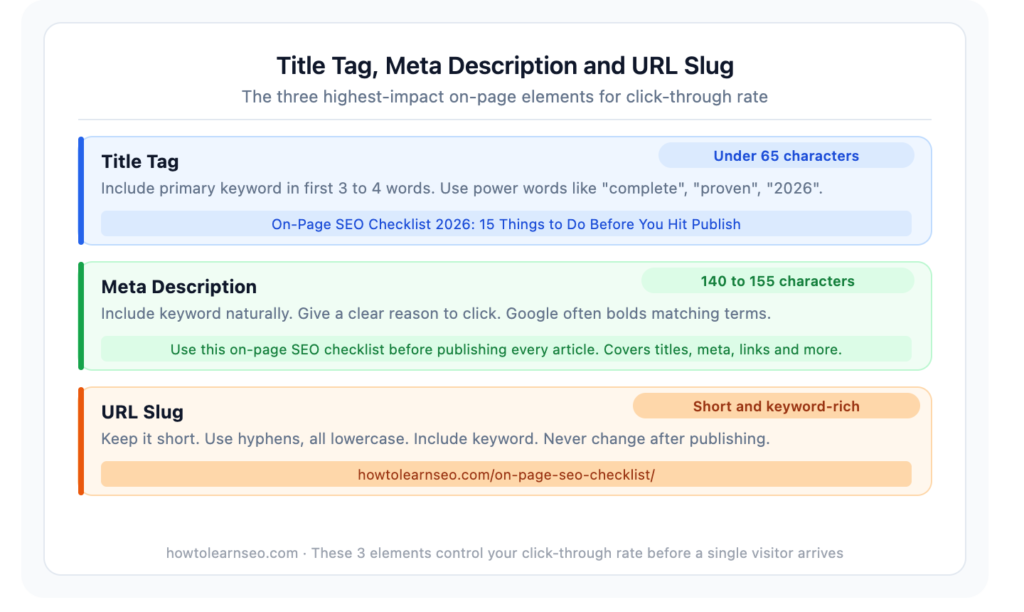
Your URL slug is the part of the web address after your domain name. A well-optimised slug is short, keyword-rich, and easy to read.
Rules for a strong URL slug:
- Include your primary keyword
- Keep it as short as possible — remove filler words
- Use hyphens between words, never underscores or spaces
- Use all lowercase letters
- Never change a slug after a page is indexed — this resets its ranking history
Check: Does your slug contain the primary keyword? Is it short, clean, and lowercase?
6. Use One H1 Heading That Includes Your Keyword
Your H1 is your main article heading — there should be exactly one per page. It signals to Google what the page is fundamentally about and should include your primary keyword naturally.
Your H1 doesn’t need to be identical to your title tag — in fact, having slight variation between them is fine and can allow you to include secondary keywords or make the heading more readable.
Check: Does your page have exactly one H1? Does it include your primary keyword?
7. Structure Content With H2 and H3 Subheadings
Subheadings break your content into logical sections that are easier for both readers and search engines to understand. Google uses heading hierarchy to understand the structure and topical coverage of your page.
Best practices for subheadings:
- Use H2 for main sections of your article
- Use H3 for subsections within H2 sections
- Include secondary and related keywords naturally in subheadings where relevant
- Frame subheadings as questions where possible — question-based headings improve chances of appearing in featured snippets and AI Overviews
Check: Does your content use a logical H2 and H3 structure? Are secondary keywords included naturally?
8. Include Your Keyword in the First 100 Words
Mentioning your primary keyword naturally within the first 100 words of your article signals the topic clearly to Google early. Don’t force it — just make sure it appears in your opening paragraph in a way that reads naturally.
Check: Does your primary keyword appear naturally within the first 100 words of your content?
9. Write Comprehensive, Helpful Content
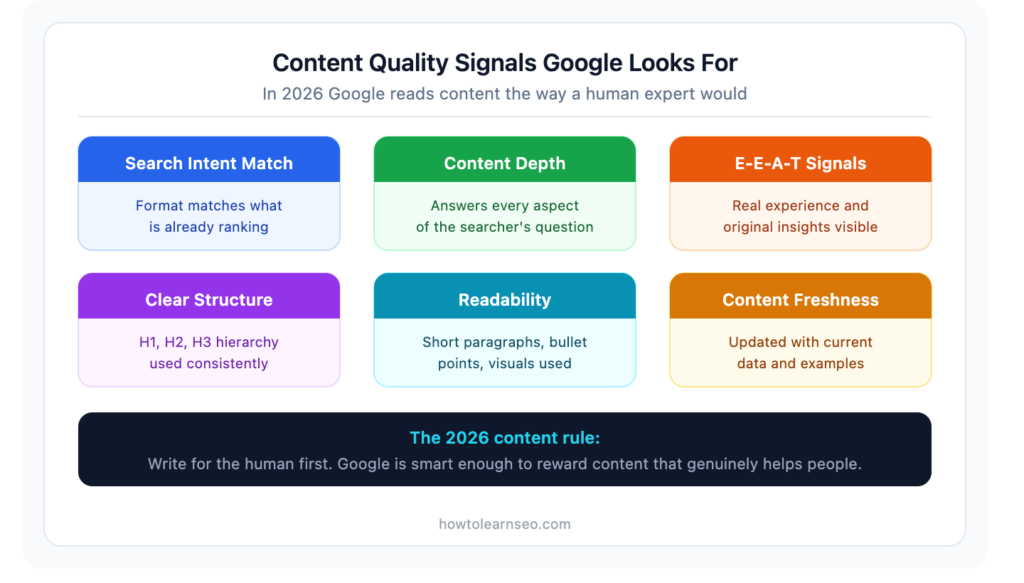
Google’s entire mission is to return the most helpful result for every search. Content that genuinely, thoroughly answers the searcher’s question will always have an advantage over thin content that only partially covers the topic.
In 2026, with AI-generated content flooding the web, Google is more aggressively rewarding content that demonstrates genuine human expertise, real examples, and original insight. Pages ranking in the top three positions for informational queries average between 1,400 and 2,500 words — but the right length is whatever is needed to completely answer the question, no more and no less.
Check: Does your content fully answer every aspect of the search query? Is it genuinely more useful than what’s already ranking?
10. Add Internal Links to Relevant Existing Articles
Every new article you publish should link to at least two or three existing articles on your site. Internal links pass authority between pages, help Google discover and index new content faster, and keep readers engaged longer.
Rules for internal linking:
- Only link to articles that are genuinely relevant to the content
- Use descriptive anchor text that includes keywords — “read our guide on keyword research” beats “click here”
- Never link to the same article twice in one post
- After publishing, update existing articles to link back to the new one
Check: Does your article link to at least 2 to 3 existing articles with descriptive anchor text?
11. Add Descriptive Alt Text to Every Image
Alt text is a short description of an image that search engines read to understand what the image shows. Every image on your page needs alt text — it’s both an SEO signal and an accessibility requirement.
Rules for strong alt text:
- Describe what the image actually shows
- Include your primary or secondary keyword naturally where relevant — don’t force it
- Keep it under 125 characters
- Never leave alt text blank
Check: Does every image on your page have descriptive alt text that includes a keyword where natural?
12. Optimise Image File Names and Sizes
Before uploading any image, rename the file using descriptive, keyword-rich words separated by hyphens. on-page-seo-checklist-2026.jpg is significantly better than IMG_4521.jpg for both SEO and image search.
Also compress every image before uploading. Large image files are one of the most common causes of slow page speed — and slow pages rank lower. Use WebP format where possible, and aim to keep each image under 100kb.
Check: Are image file names descriptive? Are all images compressed and ideally in WebP format?
13. Check Your Page Loading Speed
Page speed is a confirmed Google ranking factor. Slow pages not only rank lower — they lose visitors before they’ve read a single word. Google’s Core Web Vitals targets for 2026 are:
- LCP (Largest Contentful Paint): Under 2.5 seconds — how fast the main content loads
- INP (Interaction to Next Paint): Under 200 milliseconds — how responsive the page is
- CLS (Cumulative Layout Shift): Under 0.1 — how visually stable the page is as it loads
Use Google’s free PageSpeed Insights tool to check your score before publishing. Target above 70 on mobile as a minimum.
Check: Does your page score above 70 on mobile PageSpeed Insights? Do all Core Web Vitals pass?
14. Add Schema Markup
Schema markup is structured data code that helps Google understand the specific type and content of your page. In 2026, it directly influences your chances of appearing in featured snippets, AI Overviews, and rich results in search.
For a blog article, the two most important schema types are:
Article schema — tells Google this is a blog post, who wrote it, and when it was published. Rank Math adds this automatically to every post.
FAQPage schema — marks up your FAQ section and can trigger People Also Ask dropdowns in Google search results. Add this manually via a Custom HTML block using JSON-LD code.
Pages with FAQ schema are 60% more likely to be cited in Google AI Overviews compared to pages without it.
Check: Is Article schema active? Has FAQPage schema been added to your FAQ section?
15. Add a Well-Structured FAQ Section
A FAQ section at the end of every article serves three purposes. First, it answers follow-up questions readers might have after finishing the article. Second, it creates structured content Google can extract for featured snippets and People Also Ask results. Third, when combined with FAQ schema, it significantly improves your AI Overview citation chances.
Write five genuine questions your target audience would ask about the topic. Answer each one directly and concisely in two to four sentences.
Check: Does your article end with a FAQ section of at least five questions with direct, concise answers?
On-Page SEO Checklist Summary
Here’s the complete checklist in one place for quick reference before publishing every article:
- One primary keyword per page — no cannibalization
- Content format matches search intent
- Title tag includes keyword — under 65 characters
- Meta description includes keyword — 140 to 155 characters
- URL slug is short, keyword-rich, and lowercase
- One H1 heading includes the primary keyword
- H2 and H3 subheadings structure the content logically
- Primary keyword appears in the first 100 words
- Content is comprehensive and genuinely helpful
- At least 2 to 3 internal links with descriptive anchor text
- All images have descriptive alt text with keywords
- Image file names are descriptive and files are compressed
- PageSpeed score above 70 on mobile
- Article schema active, FAQ schema added manually
- FAQ section with at least 5 questions and direct answers
Common On-Page SEO Mistakes to Avoid
Keyword stuffing — Repeating your keyword unnaturally throughout the article to the point where it reads poorly. Google’s algorithm in 2026 detects this easily and penalises it. Write naturally and your keyword will appear often enough.
Multiple H1 tags — Every page needs exactly one H1. Multiple H1 tags confuse Google about what the page is primarily about.
Missing meta descriptions — Leaving meta descriptions blank means Google writes one for you — and it rarely says what you want it to say. Always write your own.
Identical title tags across pages — Every page needs a unique title tag. Duplicate titles tell Google your pages cover the same topic even when they don’t.
Changing URL slugs after indexing — Once a page is indexed with a slug, changing it means starting from scratch for that URL. Get slugs right before publishing and leave them alone.
Publishing without checking mobile — Over 60% of searches happen on mobile. Always preview your article on a mobile device before hitting publish.
Key Takeaways
- On-page SEO is entirely in your control — it’s the highest-leverage place to start for any beginner
- Target one primary keyword per page and match your content format to search intent
- Title tags, meta descriptions, and URL slugs are the three highest-impact elements for click-through rate
- Internal links, image optimisation, and schema markup are consistently underused by beginners
- Page speed is a confirmed ranking factor — target above 70 on mobile PageSpeed Insights
- FAQ sections with schema markup significantly improve AI Overview citation chances
- Running through this 15-item checklist before every publish takes 10 minutes and directly impacts rankings
Frequently Asked Questions
Q1: What is on-page SEO? On-page SEO is the practice of optimising individual web pages to rank higher in search engines. It covers everything you control directly on your page — content quality, title tags, meta descriptions, headings, internal links, images, schema markup, and page speed. It is entirely in your control and is the best starting point for any beginner building their first website.
Q2: How long should a title tag be for SEO? Title tags should be kept under 65 characters to avoid being cut off in Google search results. Your primary keyword should appear naturally within the first three to four words. The title should also be compelling enough to drive clicks — ranking well means nothing if people don’t click your result.
Q3: Is meta description a ranking factor? Meta descriptions are not a direct ranking factor — Google does not use them to decide where to rank your page. However, a well-written meta description significantly improves your click-through rate, and click-through rate is a user engagement signal that Google does monitor. Always write a clear, keyword-rich meta description that gives a compelling reason to click.
Q4: How many internal links should I add to each article? Add at least two to three internal links per article, linking to existing relevant articles with descriptive anchor text. After publishing, also update two to three existing articles to link back to your new post. A well-connected internal linking structure helps Google discover new content faster and distributes authority across your entire site.
Q5: Does schema markup help with rankings? Schema markup does not directly improve rankings, but it significantly improves how your content appears in search results. FAQ schema can trigger People Also Ask dropdowns in Google, and pages with FAQ schema are 60% more likely to be cited in Google AI Overviews. Article schema tells Google important details about your content including authorship and publication date.