
Starting out with SEO is exciting — until you open a browser tab and find 450 different tools all promising to skyrocket your rankings. It’s overwhelming, and honestly, most beginners pick the wrong tool simply because nobody gave them a straight answer. So here it is. We tested the most popular free and paid SEO tools available in 2026, specifically from a beginner’s perspective, and ranked them by what actually matters — ease of use, value for money, and results you can see without a six-month learning curve.
What Should a Beginner Look for in an SEO Tool?
Before diving into the list, let’s clear something up. Beginners don’t need the most powerful tool — they need the most useful one. There’s a big difference.
The right beginner SEO tool should:
- Show you keyword data in plain English — not just raw numbers
- Have a clean interface that doesn’t require a tutorial to navigate
- Be affordable enough that you’re not risking your entire budget on month one
- Cover the core tasks — keyword research, rank tracking, and basic site analysis
- Provide enough data to make real content decisions
With that filter in mind, here’s the complete breakdown.
The Best Free SEO Tools for Beginners
Every beginner should start here — before spending a single dollar on paid tools.
1. Google Search Console
This is the single most important free SEO tool available — and most beginners either ignore it or set it up and forget about it. That’s a mistake.
Google Search Console shows you exactly which keywords your site is already ranking for, how many impressions and clicks each page is getting, and which pages have indexing issues. It’s first-party data straight from Google itself — no estimation, no guesswork.
If your site is live and you haven’t connected Search Console yet, stop reading this and do that first. Seriously.
Best for: Monitoring existing rankings, finding quick-win keywords, fixing indexing issues Cost: Completely free
2. Google Keyword Planner
Built for Google Ads but genuinely useful for organic keyword research. You don’t need to run ads to use it — just create a free Google Ads account and access the tool directly.
The data leans toward commercial and high-volume terms, so it’s better for generating initial keyword ideas than for finding low-competition long-tail opportunities. But as a starting point when you have zero budget, it does the job.
Best for: Initial keyword brainstorming, understanding search volumes Cost: Completely free
3. Rank Math (WordPress Plugin)
If your site runs on WordPress, Rank Math is non-negotiable. It handles on-page optimisation directly inside your editor — meta titles, meta descriptions, schema markup, XML sitemaps, and internal linking suggestions all in one place.
The free version covers everything a beginner needs. You don’t need to understand technical SEO to use it — just follow the green, orange, and red indicators it gives you for each post.
Best for: On-page SEO, meta tags, schema markup, WordPress sites Cost: Free (premium version available)
The Best Paid SEO Tools for Beginners
Once you’re ready to invest in a paid tool, these are the options worth considering — ranked by how beginner-friendly they actually are.
1. Mangools — Best Overall for Beginners
If we had to pick just one paid tool for a complete beginner, Mangools wins. It’s not the most powerful tool on the market — it doesn’t try to be. What it does is take complex SEO data and present it in a way that anyone can understand and act on within their first hour of use.
The flagship tool KWFinder has a database of 2.5 billion keywords and shows search volume, keyword difficulty, CPC, and trend data on a single clean screen. The difficulty scores are genuinely reliable — a KD of 20 in KWFinder actually reflects something you can realistically rank for as a new site.
Beyond keyword research, you also get SERPChecker for competitor analysis, SERPWatcher for daily rank tracking, LinkMiner for backlink analysis, and SiteProfiler for domain insights — all in one subscription.
The newest addition, AI Search Watcher, tracks how your brand appears across AI search engines like ChatGPT and Gemini — genuinely useful in 2026 when AI search is eating into traditional Google traffic.
Pricing: From $29.90/month on annual billing Best for: Bloggers, freelancers, affiliate marketers, small business owners Verdict: The best starting point for anyone serious about SEO on a budget
👉 Try Mangools Free — No Credit Card Required
2. SE Ranking — Best for All-in-One Coverage
SE Ranking sits comfortably between budget tools and enterprise platforms. Starting at around $65/month, it offers keyword research, rank tracking, site audits, competitor analysis, and backlink monitoring all under one roof.
What makes it particularly good for beginners is the interface — clean, guided, and logical. You’re never staring at a screen wondering what to do next. The keyword research tool has improved significantly in 2025-2026 and now holds its own against more expensive competitors.
The rank tracker is arguably its strongest feature — accurate, fast, and detailed enough for both beginners and growing teams.
Pricing: From ~$65/month Best for: Small businesses, solopreneurs who want a complete toolkit Verdict: Great value if your budget stretches beyond Mangools
3. Ubersuggest — Best for Tight Budgets
Neil Patel’s Ubersuggest is the most accessible entry point into paid SEO tools, with plans starting around $29/month and a lifetime purchase option at $290. For someone just testing the waters, the low price removes the financial risk entirely.
It covers keyword suggestions, traffic estimates, content ideas, and basic site audits. The interface is extremely beginner-friendly — probably the cleanest of any paid tool at this price.
The honest caveat is that data accuracy is a step below Mangools or SE Ranking. Keyword difficulty scores and traffic estimates can differ noticeably from what other tools show. For casual use and early-stage sites, that’s acceptable. For serious content strategy, it becomes a limitation.
Pricing: From ~$29/month or $290 lifetime Best for: Absolute beginners who want a low-risk first paid tool Verdict:Good starting point, but plan to upgrade as your site grows
4. Surfer SEO — Best for Content Optimisation
Surfer SEO does one thing exceptionally well — it tells you exactly how to optimise an article before you publish it. Enter a keyword, and Surfer analyses the top-ranking pages and gives you a content score, recommended word count, keywords to include, and heading structure suggestions.
It’s not a full SEO suite — there’s no rank tracker or backlink tool. But for bloggers and content creators focused purely on writing content that ranks, it fills a very specific and valuable gap.
Worth noting — you need a basic understanding of SEO to get real value from Surfer. It won’t teach you the fundamentals, but it will help you execute them better once you know them.
Pricing: From ~$99/month Best for: Content creators, bloggers, affiliate marketers Verdict: Powerful for content optimisation — pair it with Mangools for a complete stack
5. Ahrefs — Best for When You’re Ready to Level Up
Ahrefs is the industry standard for SEO professionals. Its backlink database is the most comprehensive available, its keyword research is deep and accurate, and its Site Explorer tool gives you more competitive intelligence than most people know what to do with.
The reason it’s at the bottom of this beginner list isn’t quality — it’s approachability. Ahrefs rewards prior knowledge. Every extra feature is noise until you know what you’re looking for. Starting here as a complete beginner means paying $129/month for capabilities you won’t use for months.
The right time to move to Ahrefs is when your site is established, you’re publishing consistently, and you need deeper competitive analysis and link building data.
Pricing: From $129/month Best for: Intermediate to advanced SEOs, agencies, established sites Verdict: The best tool available — just not the right first tool
Which SEO Tool Should You Start With?
Here’s the honest answer based on where you are right now:
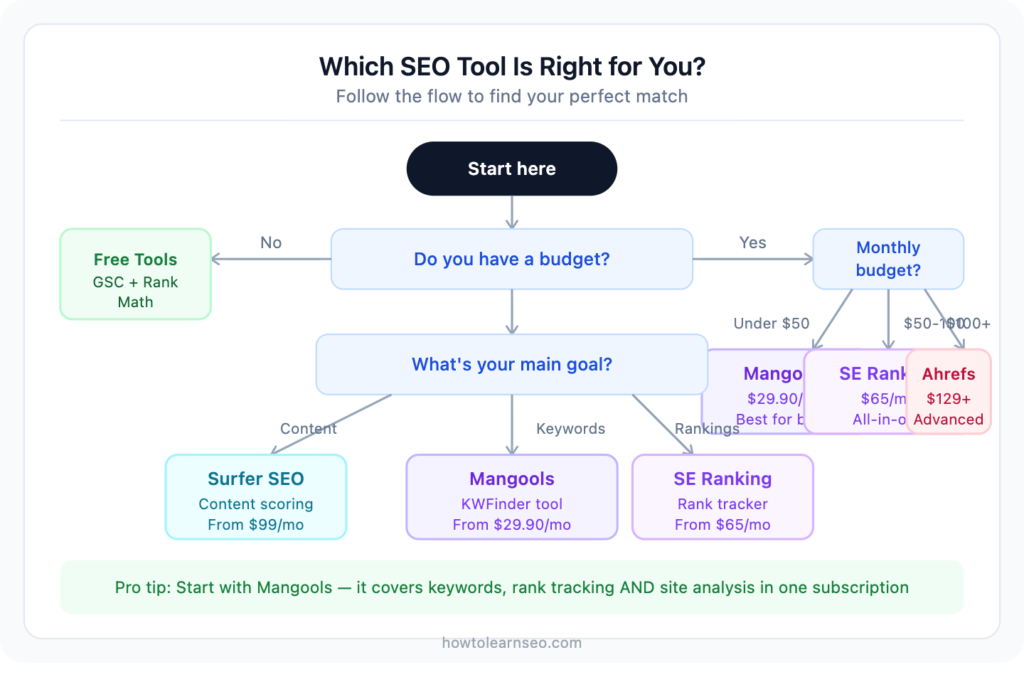
If you have zero budget: Start with Google Search Console + Google Keyword Planner + Rank Math. These three free tools together give you everything you need to start publishing and optimising content.
If you have $30/month: Mangools is the clear choice. Five tools in one subscription, beginner-friendly interface, accurate keyword data, and the most affordable full-suite option available. Start your free trial here — no credit card needed.
If you have $65/month: SE Ranking gives you slightly more depth than Mangools, particularly on site audits and competitor analysis. Good choice if you’re managing multiple sites or working with clients.
If you’re focused purely on content: Add Surfer SEO to whatever keyword tool you’re using. The combination of Mangools for keyword research and Surfer for content optimisation is a genuinely powerful stack for bloggers and affiliate marketers.
Tools to Avoid as a Beginner
A few quick warnings before you spend money on the wrong thing:
Expensive all-in-one suites too early — SEMrush starts at $139/month. Powerful? Yes. Worth it for a site with 10 articles and 200 monthly visitors? Absolutely not. Save it for when you actually need the advanced features.
Black hat ranking tools — Tools that promise to boost your rankings through link schemes, keyword stuffing, or other manipulation tactics. Google’s spam detection is sophisticated and getting smarter every update. The short-term gain is never worth the long-term penalty.
Tools with no free trial — Any serious SEO tool offers at least a free account or trial period. If a tool asks for your credit card before letting you see the interface, walk away.
Building Your First SEO Tool Stack
The smartest approach is to start minimal and add tools as your needs grow:
Stage 1 — New site (0-3 months): Google Search Console + Rank Math + Google Keyword Planner
Stage 2 — Growing site (3-6 months): Add Mangools for keyword research and rank tracking
Stage 3 — Established site (6-12 months): Add Surfer SEO for content optimisation
Stage 4 — Scaling (12+ months): Consider upgrading to SE Ranking or Ahrefs based on your specific needs
There’s no rush to jump between stages. The goal is to build skills alongside your tool investment — spending money on a tool you don’t know how to use properly is the most common mistake beginners make.
Key Takeaways
- Start with free tools — Google Search Console and Rank Math cover the basics completely
- The best first paid tool for most beginners is Mangools — affordable, accurate, and genuinely easy to use
- Match your tool investment to your site’s current stage — don’t overspend early
- Surfer SEO is worth adding once you’re consistently publishing content
- Ahrefs and SEMrush are excellent tools — just not beginner tools
- Always use a free trial before committing to any paid subscription
- The best SEO tool is the one you’ll actually use consistently
Frequently Asked Questions
Q1: What is the best free SEO tool for beginners? Google Search Console is the best free SEO tool for any beginner. It provides real data directly from Google — keyword impressions, click-through rates, ranking positions, and indexing status — all for free. Pair it with Rank Math if your site runs on WordPress.
Q2: Is Mangools good enough for a beginner blog? Yes — Mangools is arguably the best starting point for any beginner blogger or affiliate marketer. Its KWFinder tool makes keyword research straightforward, the difficulty scores are accurate, and the price is the most competitive of any full-suite tool. Most bloggers find Mangools covers everything they need for the first year of building a site.
Q3: Do I need to use multiple SEO tools? Not at first. Starting with one good keyword research tool plus Google Search Console is more than enough. As your site grows and your SEO skills develop, adding a content optimisation tool like Surfer SEO makes sense. Building your tool stack gradually prevents overwhelm and keeps costs manageable.
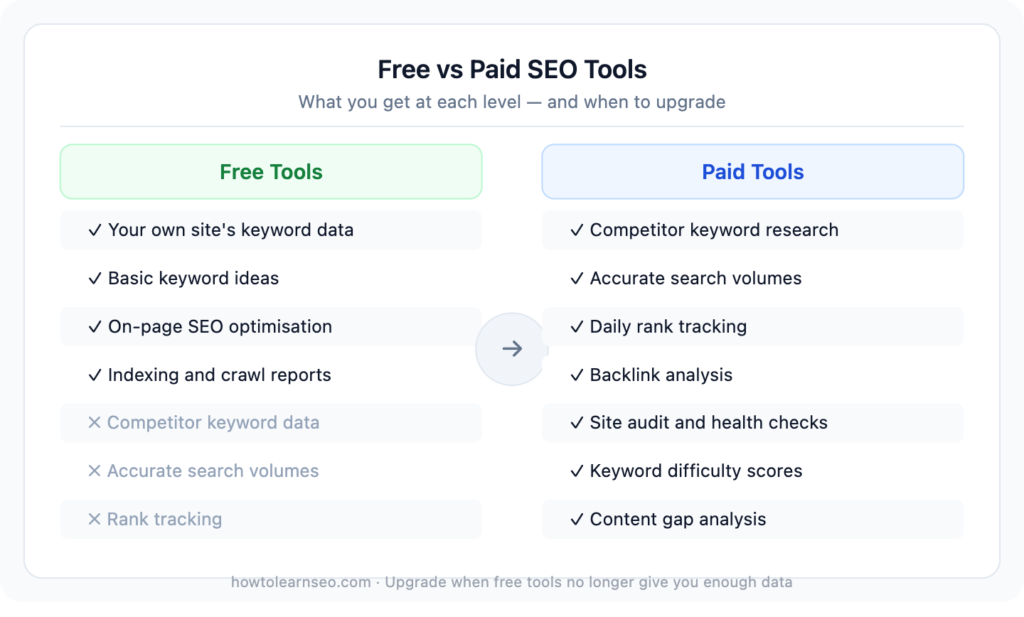
Q4: What is the difference between free and paid SEO tools? Free tools give you access to your own site’s data and basic keyword ideas. Paid tools add competitor analysis, accurate search volumes, keyword difficulty scores, rank tracking, backlink data, and site audit features. The jump from free to paid tools is most valuable once you’re publishing content consistently and need data to guide your strategy.
Q5: When should a beginner upgrade from free to paid SEO tools? The right time to upgrade is when free tools are giving you data but not enough of it — specifically when Google Search Console shows you’re ranking for dozens of queries and you want to find related opportunities you’re not targeting yet, or when you want accurate search volumes before writing new content.