
You can write the most comprehensive, well-researched article on the internet. You can target the perfect keyword, earn quality backlinks, and follow every on-page SEO rule to the letter. And still — nothing. No rankings, no traffic, no visibility. If this sounds familiar, technical SEO is almost certainly the reason. It is the invisible layer underneath everything else in SEO, and when it breaks, nothing above it works properly. This guide covers exactly what technical SEO is, why it matters more in 2026 than ever before, and the specific elements every beginner needs to understand and fix first.
What Is Technical SEO?
Technical SEO is the process of optimising your website’s infrastructure so search engines can efficiently crawl, index, and rank your pages. Unlike content SEO which focuses on what you say, and off-page SEO which focuses on who links to you, technical SEO focuses on how your site works from the inside out — the speed, structure, security, and accessibility that determine whether Google can actually read your content.
Think of your website like a physical store. Your content is the products on the shelves. On-page SEO is how those products are displayed and labelled. Technical SEO is the building itself — the doors, the lighting, the signage, the accessibility ramps. If the building is broken, nobody gets inside to see the products regardless of how good they are.
In 2026, technical SEO has expanded beyond just pleasing Google’s crawler. AI search engines — Google AI Overviews, ChatGPT Search, Perplexity — all evaluate your site’s technical signals before deciding whether to cite it as a source. A technically optimised site is now a prerequisite for visibility across both traditional search and AI-generated summaries.
When we first set up howtolearnseo.com, the most urgent technical task was checking for any issues left behind by the previous domain owner — manual penalties, toxic backlinks, and misconfigured redirects. Fixing those foundation issues before publishing any new content meant every article we published started from a clean technical base rather than fighting against inherited problems.
Why Technical SEO Matters More in 2026
Technical SEO has never been more important than it is right now. Three specific shifts in 2026 have made it the highest-priority area for any new or growing website.
Google evaluates mobile first. Mobile-first indexing is complete — meaning Google crawls and ranks the mobile version of your site, not the desktop version. If your mobile experience is broken, slow, or incomplete, your rankings reflect that regardless of how polished your desktop version is. Over 60% of all searches happen on mobile devices.
Core Web Vitals directly affect rankings. Google’s performance metrics — LCP, INP, and CLS — are confirmed ranking signals. A slow, unstable page will consistently rank below a faster competitor with similar content quality. This is no longer a soft suggestion — it is a measured, algorithmic factor.
For a complete guide on fixing your WordPress speed scores, read our full WordPress speed optimisation guide.
AI systems need technically clean sites to cite. When Google AI Overviews, ChatGPT, and Perplexity decide which sources to pull from, they need unobstructed access to your content. Technical barriers — slow loading, JavaScript rendering issues, blocked pages — prevent AI systems from reading your content the same way they prevent Google’s crawler from indexing it.
The 8 Core Pillars of Technical SEO
1. Crawlability — Can Google Find Your Pages?
Crawlability is whether search engine bots can access and read your pages. Before Google can rank anything it has to find it first — and if something blocks that process, those pages simply don’t exist in search results.
The two most important crawlability controls are your robots.txt file and your internal linking structure. Your robots.txt file lives at yoursite.com/robots.txt and tells crawlers which pages to access and which to ignore. A correctly configured robots.txt allows Google to access all important content while blocking pages you don’t want indexed — admin pages, duplicate parameter URLs, and staging environments.
Internal linking plays an equally important technical role. Every important page on your site should be reachable within three clicks from your homepage. Orphan pages — articles with no internal links pointing to them — are functionally invisible to Google’s crawler regardless of how strong their content is.
Quick check: Type site:yoursite.com into Google. The number of results shown tells you roughly how many of your pages are indexed. If it’s significantly lower than your total page count — you have a crawlability problem worth investigating.
2. Indexability — What Google Actually Stores
Indexability is whether Google stores your pages in its database after crawling them. A page can be perfectly crawlable and still not indexed — which means it never appears in any search result.
The most common indexability issues are pages accidentally set to noindex, canonical tags pointing to the wrong URL, and duplicate content confusing Google about which version to rank. All of these are invisible to the casual site owner but immediately visible in Google Search Console.
Check your indexation status under Coverage or Pages in Search Console. Any pages showing as “Excluded” have a specific reason attached — and most are fixable within minutes once identified.
3. Page Speed and Core Web Vitals — The Performance Signals
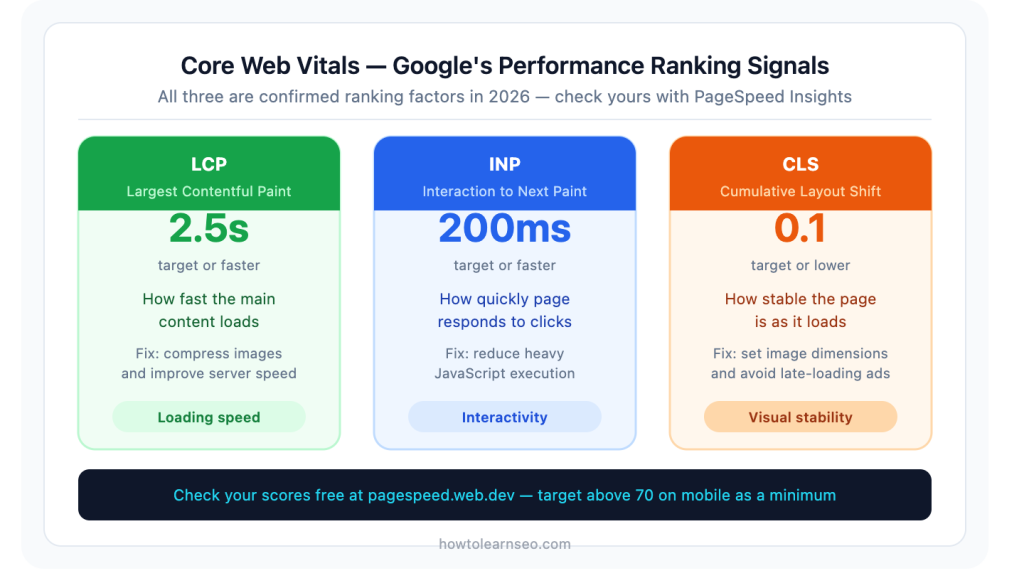
Page speed is a confirmed Google ranking factor measured through three specific Core Web Vitals metrics. Missing these targets directly suppresses your rankings regardless of content quality.
LCP (Largest Contentful Paint) measures how fast the main content loads. Target: under 2.5 seconds. The most common cause of poor LCP on content sites is large uncompressed images — something we fixed on howtolearnseo.com by converting all featured images to WebP format and compressing everything below 100kb before uploading. The difference was immediate and measurable in PageSpeed Insights.
INP (Interaction to Next Paint) replaced the old FID metric in March 2024. It measures how quickly your page responds when a user clicks or interacts. Target: under 200 milliseconds. Poor INP is typically caused by heavy JavaScript — a common issue on WordPress sites with too many poorly coded plugins.
CLS (Cumulative Layout Shift) measures how visually stable your page is as it loads — whether elements jump around unexpectedly as images and fonts render. Target: under 0.1. This is the one that makes pages feel unstable and untrustworthy when it fails.
Use Google’s free PageSpeed Insights at pagespeed.web.dev to check all three scores. Target above 70 on mobile as a minimum — above 90 is excellent.
4. Mobile-First Indexing — Your Mobile Site Is Your SEO Site
Google uses the mobile version of your site as the primary basis for all crawling and ranking decisions. This means if your mobile site is missing content that exists on your desktop version, Google ranks you based on what’s missing.
What mobile-first indexing means in practice: your mobile and desktop content must be identical. Navigation, headings, body text, images, and schema markup should all be fully accessible on mobile screens. Tap targets — buttons and links — should be large enough to use comfortably on a touchscreen without zooming.
Use Google’s free Mobile-Friendly Test to check your site passes mobile usability requirements. Any issues flagged there are ranking issues, not just design preferences — treat them accordingly.
5. HTTPS and Site Security — The Trust Signal
HTTPS is a confirmed Google ranking signal and a non-negotiable baseline in 2026. If your site still runs on HTTP, every browser displays a “Not Secure” warning to visitors before they’ve read a single word — which destroys trust immediately and increases bounce rates significantly.
An SSL certificate encrypts the connection between your server and your visitors. Most hosting providers include free SSL certificates. In WordPress, plugins like Really Simple SSL handle the configuration automatically once the certificate is installed by your host.
Beyond HTTPS, site security also covers protection against malware, hacking attempts, and spam injections — all of which Google’s Search Console monitors under Security Issues. A compromised site can be completely removed from search results until resolved.
6. XML Sitemaps — Your Site’s Roadmap for Google
An XML sitemap is a file listing all the pages on your site that you want Google to find and index. Think of it as handing Google a direct map rather than making the crawler find everything by following links alone.
Without a sitemap Google still discovers most pages through internal links — but a properly submitted sitemap speeds up discovery significantly, especially for new content. Every time you publish a new article, a submitted sitemap helps Google find and index it faster than it would through crawling alone.
In WordPress with Rank Math installed, your sitemap is automatically generated at yoursite.com/sitemap_index.xml. Submit this URL in Google Search Console under Sitemaps and Google checks it regularly for new pages.
7. Schema Markup — Structured Data for AI and Search
Schema markup is code you add to pages that helps both search engines and AI systems understand the specific type and content of your page. In 2026 it serves a dual purpose — enabling rich results in traditional search and significantly improving how AI systems extract and cite your content.
For a content site, the two highest-value schema types are Article schema — which Rank Math adds automatically to every post — and FAQPage schema, which you add manually via a Custom HTML block at the bottom of each article. Pages with FAQ schema are significantly more likely to appear in Google’s People Also Ask results and to be cited in AI Overview summaries.
8. URL Structure — Clean, Logical, Keyword-Rich
A clean URL tells both search engines and users what a page is about before they open it. Good URLs are short, descriptive, use hyphens between words, contain the target keyword, and use all lowercase letters.
Good URL: howtolearnseo.com/what-is-technical-seo/ Poor URL: howtolearnseo.com/page?id=1247&cat=seo&type=post
Get your URL slugs right before publishing and never change them after a page is indexed. Changing a URL after indexing means starting from scratch for that address — all the authority built up at the old URL is lost unless you set up a 301 redirect.
Technical SEO vs On-Page SEO vs Off-Page SEO
These three areas are often confused. Here is the clearest way to understand how they relate to each other.
Technical SEO is the infrastructure. It makes your site accessible, fast, and readable to search engines. It fixes the foundation so everything else can work.
On-page SEO is the content layer. It optimises what’s on each individual page — titles, headings, keywords, internal links, and images. It builds on top of the technical foundation.
Off-page SEO is the reputation layer. It builds authority through backlinks and brand mentions. It amplifies what’s already technically sound and well-optimised on-page.
The relationship is sequential. Technical SEO must come first. On-page optimisation builds on top of it. Off-page efforts amplify the combination. Trying to build backlinks to a technically broken site is like sending customers to a store with locked doors — they arrive and find nothing accessible.
How to Do a Basic Technical SEO Audit
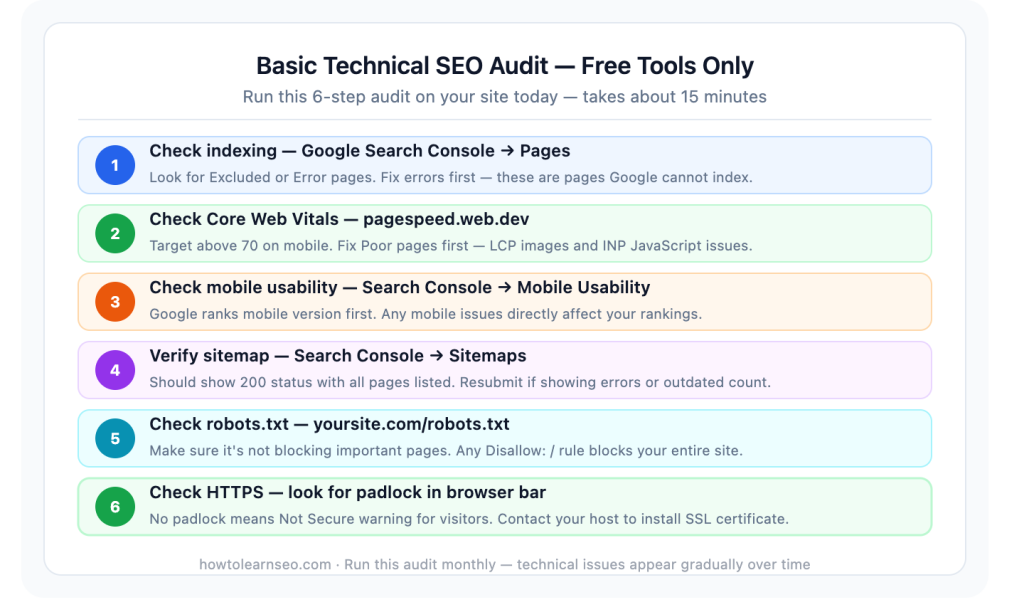
You do not need expensive tools to identify the most common technical SEO issues. Here is a basic audit process using only free tools — the same process we run on howtolearnseo.com monthly.
Step 1 — Check indexing in Google Search Console Go to Coverage / Pages and look for any pages showing as “Excluded” or “Error.” Each has a specific cause listed. Address errors first — these are pages Google actively cannot index.
Step 2 — Check Core Web Vitals Go to Experience → Core Web Vitals in Search Console. Any pages showing as “Poor” or “Needs Improvement” need attention. Cross-reference with PageSpeed Insights for specific actionable fixes.
Step 3 — Check mobile usability Go to Experience → Mobile Usability in Search Console. Any issues flagged here directly affect your rankings since Google evaluates mobile first.
Step 4 — Verify your sitemap Go to Sitemaps in Search Console. Your sitemap should show a 200 status code with all your pages listed. Resubmit if showing errors or an outdated page count.
Step 5 — Check robots.txt Visit yoursite.com/robots.txt in your browser. Make sure it is not blocking important pages. Any Disallow: / rule tells Google to crawl nothing — which is catastrophic.
Step 6 — Check HTTPS Look for the padlock icon in your browser address bar. If you see “Not Secure” — contact your host and get an SSL certificate installed immediately.
📌 SUPPORTING IMAGE 2 POSITION Alt text: technical SEO audit checklist free tools 2026 👆 Upload Supporting Image 2 here — after the audit section, before Technical SEO for AI heading
Technical SEO for AI Search in 2026
Technical SEO now influences your visibility in AI search as much as it does in traditional Google rankings. Here is what matters specifically for AI systems.
Structured data signals content type to AI. When ChatGPT, Perplexity, and Google’s AI Overviews crawl your site, they look for schema markup to understand what type of content you have. Article, FAQPage, and HowTo schema all help AI systems categorise and cite your content correctly.
robots.txt now governs AI training vs retrieval. There is an important distinction in 2026 between training bots — which scrape content to train AI models — and retrieval bots — which fetch content in real-time to answer user queries. You can specifically allow retrieval bots while blocking training bots if you want to control how your content is used by AI companies.
Clean parseable content gets cited more. AI systems prefer content that is easy to read and extract. Long unbroken paragraphs, content buried in JavaScript, and text trapped in PDFs are significantly harder for AI to process than clean HTML with clear headings, short paragraphs, and direct answer-first structure.
Common Technical SEO Mistakes to Avoid
Accidentally blocking your site in robots.txt. A single misplaced Disallow: / rule blocks every crawler from your entire site. Always double-check robots.txt after any configuration changes.
Ignoring mobile usability. A site that passes all desktop checks but fails mobile usability is ranking on its weakest version since Google evaluates mobile first.
Leaving images uncompressed. Oversized images are the single most common cause of poor LCP scores on content sites. Compress every image before uploading and use WebP format where possible.
Duplicate content from URL parameters. If your site generates multiple URLs for the same content — through sorting options, filters, or session IDs — use canonical tags to tell Google which version to index.
Broken internal links. Links pointing to 404 pages waste crawl budget and create dead ends for both users and bots. Check and fix internal links monthly.
Not submitting a sitemap. Publishing content and hoping Google finds it organically is significantly slower than submitting a sitemap. Always submit through Search Console from day one.
Key Takeaways
- Technical SEO is the infrastructure layer that everything else in SEO builds on — without it even the best content will not rank
- Google uses mobile-first indexing — your mobile site is what gets crawled and ranked, not your desktop version
- Core Web Vitals — LCP under 2.5 seconds, INP under 200 milliseconds, CLS under 0.1 — are confirmed ranking factors with measurable targets
- A correctly configured robots.txt, XML sitemap, and active HTTPS certificate are the non-negotiable technical foundations for any site
- Schema markup helps both traditional Google rankings and AI search citations — FAQPage schema is the highest-leverage type for content sites
- A basic technical SEO audit using Google Search Console is completely free and identifies the most common issues within 15 minutes
- In 2026 technical SEO also governs AI search visibility — clean, structured, parseable content gets cited by AI systems far more consistently
- Technical issues affect your entire domain — not just individual pages — so fixing them has a compounding positive effect across all your content
Frequently Asked Questions
Q1: What is technical SEO in simple terms? Technical SEO is the process of making sure your website is built in a way that search engines can easily find, access, read, and rank. While content tells Google what your site is about and backlinks tell it how authoritative you are, technical SEO makes sure Google can actually get to your content in the first place. It covers site speed, mobile performance, crawlability, indexing, security, and site structure — the foundation everything else sits on.
Q2: Is technical SEO difficult for beginners? The basics are very manageable on WordPress. Installing Rank Math handles many technical requirements automatically — sitemaps, schema, robots.txt configuration, and redirect management. The most important beginner steps are setting up Google Search Console, ensuring HTTPS is active, submitting your sitemap, and checking Core Web Vitals with PageSpeed Insights. None of these require coding knowledge.
Q3: How does technical SEO differ from on-page SEO? On-page SEO covers what is on each individual page — the content, titles, headings, keywords, and internal links. Technical SEO covers the infrastructure those pages sit on — how fast they load, whether Google can crawl them, how the site is structured, and whether the server configuration is correct. Both are necessary, but technical SEO comes first — it is the foundation on-page optimisation builds on.
Q4: What are Core Web Vitals and do they affect rankings? Core Web Vitals are three performance metrics Google uses to measure page experience: LCP measures how fast the main content loads with a target under 2.5 seconds, INP measures how quickly the page responds to user interactions with a target under 200 milliseconds, and CLS measures how visually stable the page is with a target under 0.1. All three are confirmed Google ranking factors — pages that fail Core Web Vitals consistently rank below healthier pages with similar content quality.
Q5: How do I check if my site has technical SEO issues? The best free starting point is Google Search Console. Check Pages for indexing issues, Experience for Core Web Vitals and mobile usability, and Sitemaps to verify your sitemap is correctly submitted. For page speed specifically, Google’s free PageSpeed Insights tool gives a detailed score and specific recommendations. Running both checks takes about 15 minutes and reliably identifies the most common technical issues any content site faces.