
Publishing a blog post and hoping Google finds it is not a strategy — it’s wishful thinking. In 2026, with hundreds of millions of blog posts competing for the same search results, the difference between ranking on page one and disappearing on page five comes down to how deliberately you write and structure your content. The good news is that SEO-friendly writing is a learnable skill. Once you understand the principles, they become second nature — and every article you publish becomes a genuine asset that drives traffic for months and years ahead. This guide walks you through every step, from choosing the right keyword to the final checks before you hit publish.
What Does SEO-Friendly Actually Mean in 2026?
The definition has evolved. Writing an SEO-friendly blog post used to mean placing keywords in the right spots and calling it done. That approach stopped working years ago.
In 2026, an SEO-friendly blog post does three things simultaneously:
It satisfies the searcher’s intent completely — the person who lands on your page finds exactly what they were looking for and doesn’t need to go back to Google for more.
It’s structured so Google and AI systems can extract answers from it — clear headings, direct answers at the start of each section, and logical organisation that machines can read as easily as humans.
It demonstrates genuine expertise — not just information that exists everywhere, but insight, examples, and depth that prove the author actually knows the subject.
Getting all three right is what separates articles that rank from articles that don’t.
Step 1 — Start with Keyword Research
Every SEO-friendly blog post begins before you write a single word — with keyword research. You need to know exactly what your audience is searching for before you decide what to write.
Find your primary keyword first
Your primary keyword is the main search query you want your article to rank for. It should have real search volume — meaning people are actually searching for it — and it should match the topic you’re writing about as precisely as possible.
Use free tools like Google’s People Also Ask boxes, the related searches section at the bottom of Google results, and Google Keyword Planner to identify what real people are typing. For more accurate data on search volume and keyword difficulty, tools like Mangools KWFinder make this process significantly faster and more reliable.
Target long-tail keywords as a beginner
Long-tail keywords — phrases of four or more words with specific intent — are where new and growing sites win. “How to write SEO-friendly blog posts for beginners in 2026” will rank faster and attract more qualified readers than “blog writing tips” ever will on a site without established authority.
Check what’s already ranking
Before writing, search your target keyword on Google and look at the top three results. What format are they — listicles, how-to guides, comparisons? How long are they? What subtopics do they cover? This tells you exactly what Google already rewards for this keyword — and gives you a clear brief for what your article needs to match or exceed.
Step 2 — Match Your Content to Search Intent
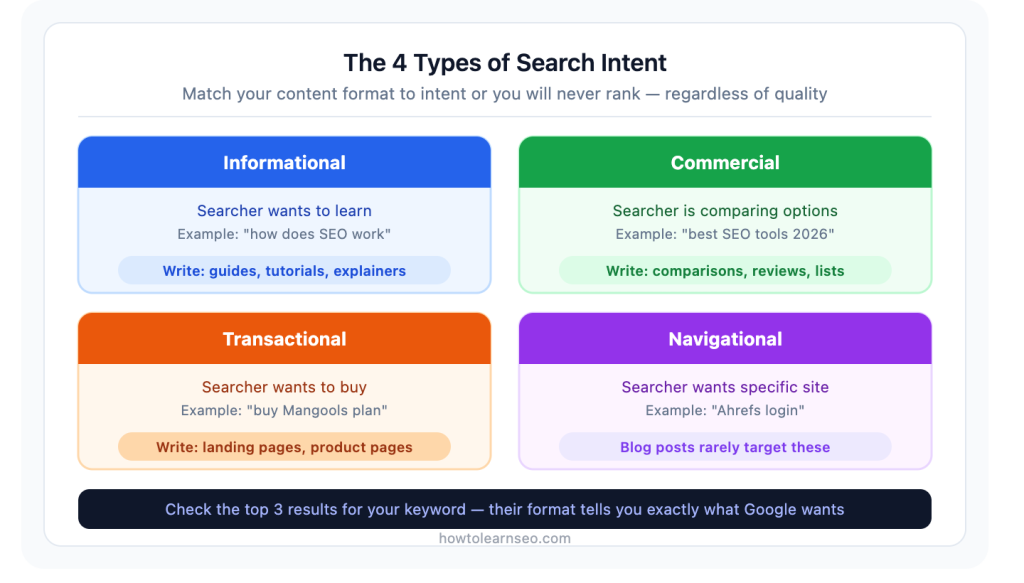
Search intent is the reason behind a search query. It’s the single most important factor in whether your article ranks — more important than keyword placement, word count, or any technical detail.
There are four types of intent:
Informational — the searcher wants to learn something. “How does SEO work” is informational. Your content format should be a guide or explainer.
Navigational — the searcher wants to find a specific website or page. “Ahrefs login” is navigational. Blog posts rarely target these.
Commercial — the searcher is comparing options before deciding. “Best SEO tools for beginners” is commercial. Your content should be a comparison or review.
Transactional — the searcher wants to buy or sign up. “Buy Mangools subscription” is transactional. Landing pages suit these better than blog posts.
Identify the intent behind your target keyword before writing a single word. If you write an in-depth educational guide for a keyword where everyone in the top ten is writing comparison articles — you will not rank. Google has already told you what it wants to see by showing you what it already rewards.
Step 3 — Write a Title That Gets Clicks
Your title does two jobs: it tells Google what your page is about, and it convinces real people to click on your result instead of the five others on the same page. Both matter equally.
Rules for a strong SEO title:
Include your primary keyword as close to the beginning as possible. Keep it under 65 characters so it doesn’t get cut off in search results. Add a compelling element — a number, a year, a power word, or a clear benefit statement. “How to Write SEO-Friendly Blog Posts in 2026: Complete Step-by-Step Guide” does all of this.
What makes people click on a result? Specificity, clarity, and the feeling that this particular result will answer their question better than the others. “Complete guide”, “step-by-step”, “for beginners”, “that actually work” — these phrases signal thoroughness and relevance. Use them where they fit naturally, not as filler.
Step 4 — Structure Your Article Before Writing
The biggest mistake most bloggers make is starting to write without a clear structure. The result is a wandering article that covers some points in too much depth, glosses over others, and leaves the reader unsatisfied.
Build your outline first:
- Introduction — establish what the article covers and why it matters
- H2 sections — one for each major subtopic or step
- H3 subsections — for detailed points within each H2
- FAQ section — five question-and-answer pairs at the end
- Key takeaways — a quick summary of the most important points
A well-structured outline also reveals gaps. If you can’t fill four to six substantial H2 sections on a topic, your keyword might be too narrow — or you might need to research more before writing.
Step 5 — Write the Introduction Properly
Most introductions are too long, too vague, or too focused on telling the reader what they’re about to read rather than making them want to read it. Google measures how quickly readers engage with your content after arriving. A weak introduction that loses people in the first paragraph is an engagement signal Google notices.
A strong introduction does three things quickly:
Hooks with relevance — shows the reader immediately that this article is exactly what they were looking for.
Acknowledges the problem or question — validates why they’re searching in the first place.
Previews the value — tells them specifically what they’ll get from reading on, without summarising the entire article.
Your primary keyword should appear naturally within the first 100 words. Don’t force it — just make sure it’s there early enough to signal the topic clearly to Google.
Step 6 — Write Content That Genuinely Answers the Question
This sounds obvious. In practice, most blog posts fail here. They cover the surface of a topic without going deep enough to leave the reader with a complete answer.
Go beyond what everyone else says
Before writing any section, ask: what do the top-ranking articles say about this? Then ask: what do they miss, gloss over, or get wrong? That gap is where your article adds genuine value. Original perspective, first-hand experience, specific examples from real situations — these are what make an article worth ranking above the competition.
Write for humans first
In 2026, Google’s algorithm is sophisticated enough to detect content written for algorithms rather than people. Unnatural keyword repetition, robotic transitions, padding that adds words without adding value — all of these are signals that suppress rankings rather than improve them. Write the way you’d explain something to a knowledgeable friend. Clear, direct, occasionally conversational. The SEO follows naturally from genuinely good writing.
Cover the topic completely
After reading your article, the person who found it should not need to search for anything else on that topic. Every reasonable follow-up question should already be answered. This is what Google means by “helpful content” — and it’s what keeps readers on your page long enough to send the engagement signals that improve rankings over time.
Step 7 — Use Headings Strategically
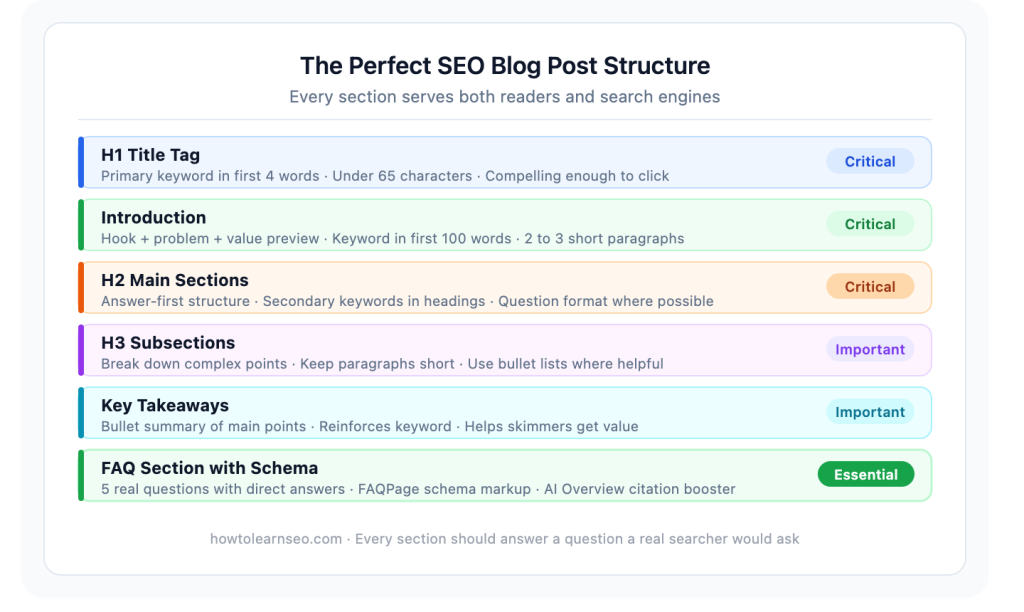
Headings are not just for organisation — they’re one of the most important on-page SEO elements you control. Google uses them to understand the structure and topical coverage of your page.
H1 — your main article title. One per page. Contains your primary keyword.
H2 — major sections of your article. Each H2 should cover a distinct subtopic. Include secondary and related keywords naturally in H2 headings where relevant.
H3 — subsections within H2 sections. Use these for detailed breakdowns of specific points.
Question-based headings — “How do you optimise a blog post for SEO?” rather than “SEO optimisation tips” — improve your chances of appearing in featured snippets and Google’s People Also Ask results. They also make your content more naturally aligned with how people actually search.
Never use headings just to break up long walls of text. Each heading should genuinely introduce a new, distinct section of content.
Step 8 — Optimise Every On-Page Element
Once your content is written, go through every on-page SEO element before publishing:
Meta description — write a 140 to 155 character summary that includes your keyword naturally and gives a clear, compelling reason to click. Don’t leave this blank and let Google choose something random.
URL slug — short, keyword-rich, lowercase with hyphens. Get it right before publishing and never change it after the page is indexed.
Image alt text — every image needs a descriptive alt text that includes a keyword where natural. Never leave alt text blank.
Image file names — rename image files before uploading. seo-friendly-blog-post-structure.jpg is better than IMG_4521.jpg for both SEO and image search.
Image compression — large images are one of the most common causes of slow page speed. Compress every image before uploading and use WebP format where possible.
Internal links — link to two or three relevant existing articles with descriptive anchor text. Internal linking passes authority between pages and keeps readers exploring your site.
For a complete checklist of every on-page element to optimise before publishing, refer to our on-page SEO checklist.
Step 9 — Write for AI Overviews and Featured Snippets
In 2026, getting your content cited in Google’s AI Overviews is one of the highest-value things a blog post can achieve. It places your content at the very top of search results — above even the number one organic position.
Two writing techniques significantly improve your chances:
Answer-first structure — begin every H2 section with a direct, clear answer to the question that section addresses. Don’t make Google or the reader hunt through paragraphs to find the point. State it immediately, then expand.
FAQ sections — a properly written FAQ section at the end of every article, ideally with FAQPage schema markup, directly feeds the question-based queries that trigger AI Overviews. Pages with FAQ schema are significantly more likely to be cited in AI-generated summaries.
If you want to understand more about how Google’s AI Overviews work and how to get your content cited, read our complete guide on what Google AI Overviews are.
Step 10 — Add Schema Markup
Schema markup is structured data that helps Google understand the specific type and content of your page. For blog posts, two types matter most:
Article schema — tells Google this is a blog post with an identifiable author and publication date. If you use Rank Math, this is added automatically to every post.
FAQPage schema — marks up your FAQ section and can trigger People Also Ask dropdowns in search results. Add this manually via a Custom HTML block at the bottom of your article using JSON-LD format.
Step 11 — Review Before Publishing
Before hitting publish, run through this final checklist:
- Is the primary keyword in the title, first 100 words, at least one H2, and the meta description?
- Is the meta description between 140 and 155 characters?
- Is the URL slug short, keyword-rich, and correct?
- Do all images have alt text?
- Are internal links added with descriptive anchor text?
- Is the FAQ section written and schema added?
- Does the article fully answer the searcher’s question?
- Is the content genuinely better than what’s currently ranking?
If the answer to every question is yes — publish. If any answer is no — fix it first.
Common SEO Blog Writing Mistakes to Avoid
Writing without a target keyword — every article needs a specific keyword with real search volume. Publishing content without keyword research produces content nobody searches for.
Targeting competitive keywords too early — new and growing sites can’t rank for “SEO tips.” Target long-tail, low-competition variations first and build up as your domain authority grows.
Keyword stuffing — repeating your keyword unnaturally throughout the article. Google detects this and suppresses it. Write naturally and your keyword will appear often enough.
Thin introductions — losing readers in the first paragraph before they’ve engaged with the content. Get to the point quickly.
Publishing and forgetting — SEO-friendly blog posts need periodic maintenance. Update outdated statistics, refresh examples, and add new internal links as your site grows. Content that stays current ranks better over time.
Ignoring mobile — over 60% of searches happen on mobile. Always preview your article on a mobile device before publishing. If it’s hard to read on a phone, it needs reformatting.
Key Takeaways
- SEO-friendly writing in 2026 means satisfying search intent completely, structuring content for AI extraction, and demonstrating genuine expertise
- Start every article with keyword research — publish nothing without a target keyword that has real search volume
- Match your content format to search intent — wrong format means no rankings regardless of quality
- Answer-first structure — lead every section with a direct answer, then expand — is the single most effective technique for AI Overview citations
- Every on-page element matters — title tag, meta description, URL slug, alt text, and internal links all contribute to rankings
- FAQ sections with schema markup significantly improve AI Overview citation chances
- Review every article against a consistent pre-publish checklist before going live
- Update published articles periodically — fresh, accurate content consistently outranks stale content targeting the same keyword
Frequently Asked Questions
Q1: What makes a blog post SEO-friendly in 2026? A blog post is SEO-friendly in 2026 when it completely satisfies the searcher’s intent, uses a clear heading structure that machines and humans can navigate easily, demonstrates genuine first-hand expertise, includes properly optimised on-page elements like title tags and meta descriptions, and is structured with direct answers that AI systems can extract and cite. Technical optimisation and genuine helpfulness must work together — neither alone is sufficient.
Q2: How long should an SEO-friendly blog post be? There is no universal ideal length — the right length is whatever is needed to completely answer the searcher’s question. Pages ranking in the top positions for informational queries typically range from 1,500 to 3,000 words, not because length itself is a ranking factor but because thorough coverage of a topic naturally produces longer content. Focus on completeness rather than hitting a word count.
Q3: How many keywords should I use in a blog post? Target one primary keyword per post. Beyond that, include related secondary keywords and semantic variations naturally throughout the content — in subheadings, body text, and the FAQ section. Never force keywords into places where they read unnaturally. Modern search engines understand topical relevance far better than raw keyword counts, so natural, comprehensive coverage of your topic will always outperform keyword stuffing.
Q4: Should I update old blog posts for SEO? Yes — updating existing blog posts is often more effective than publishing new ones for improving rankings. Audit your published articles every six months. Update outdated statistics, add new sections covering topics you missed, improve internal links to newer articles, and refresh the meta title and description if click-through rates are low. Add a visible “Last Updated” date to signal freshness to both readers and Google.
Q5: How do I get my blog post cited in Google AI Overviews? Structure your content with answer-first writing — lead each section with a direct answer before expanding. Use question-based H2 and H3 headings. Add a FAQ section with FAQPage schema markup. Build topical authority by publishing multiple interlinked articles on related subjects. Keep content updated with current data. These signals collectively make your content more likely to be selected as a source in AI-generated summaries.